PROJECT SCOPE
• Mot à Mot
• Date: October 2025 - Present
• Duration: Ongoing
• My Role: UX Researcher, UI Designer, Team Lead
• Methodology: Information Architecture, User Flows, Affinity Diagrams, Surveys, Usability Testing, User Personas
• Tools: Figma, Zoom
RESEARCH OBJECTIVE
• Mot à Mot (French for "word for word") is an early-stage product that bridges the gap between the user and their language-learning goals.
• This means understanding interests and pain points that potential users might have while developing their skills in a different language.
• Mot à Mot seeks to offer features that are often not included in other notetaking platforms, such as grammar and vocabulary quizzes, flashcards, group forming, and community forums that gauge language-exchange.
WHAT WAS THE PROBLEM?
• There are very few digital note-taking applications that focus on language-learning, creating a significant gap for users.
HOW MIGHT WE. . .
• Develop an engaging and interactive application that allows users to explore, organize, and track their language-learning interests?
PROJECT CONTRAINTS
• This project was conducted under tight time constraints, which required prioritizing speed and efficiency throughout the design and research phases.
• Nonetheless, I prioritized a user-centered approach and focused on thoughtful, effective solutions to the user problem.
• Due to the fact that I couldn't run several iterations, I focused on highlighting functionality and core features.
COMPETITOR ANALYSIS
• I analyzed several platforms such as Notion, Evernote, and Quizlet, mainly focusing on the advantages they provide for language-learners.
• While these applications can certainly be leveraged for language-learning purposes, they primarily focus on general notetaking, creating a disparity for some learners.
• A key insight from my analysis was that many of these platforms had excellent organization and features, but lacked the niche appeal that many language-learners might need.

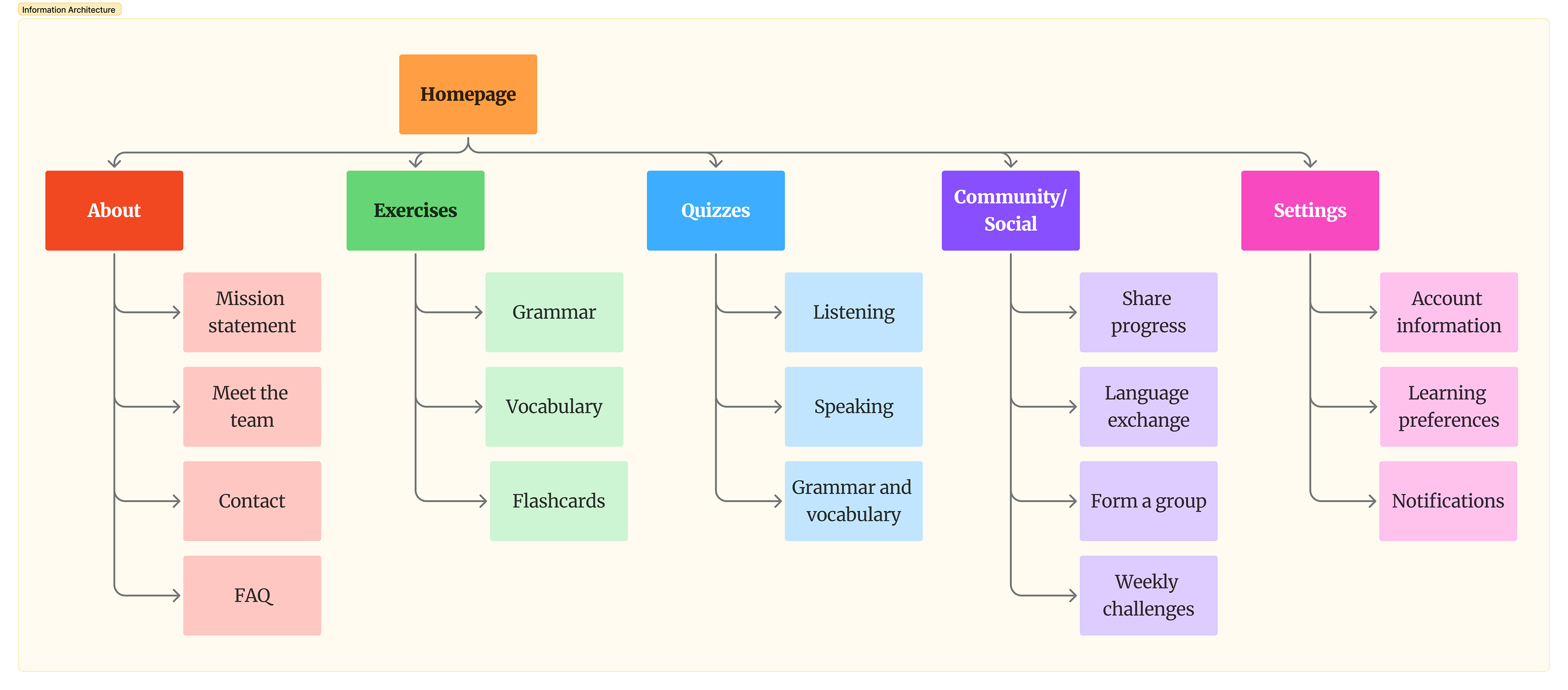
INFORMATION ARCHITECTURE
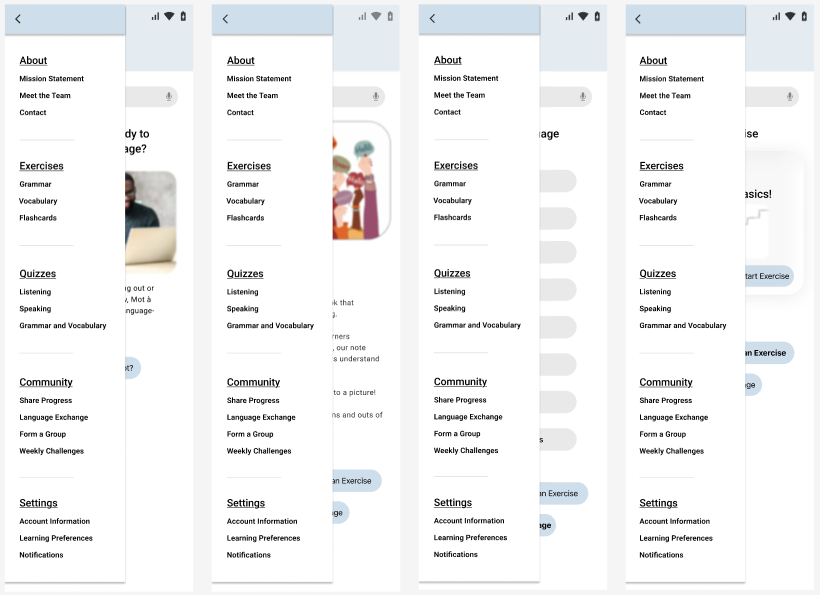
• Prior to developing the prototype, it was integral that I first layout the features that would help users navigate the platform and ensure easy navigation.
• By generating a functional model of the content structure, I have greater confidence that the prototypes meet the needs of users who seek language-learning features.
• Given that are very few notetaking applications that focus specifically on languages, the aims of the IA were simplicity, functionality, and consistency.
USER FLOW
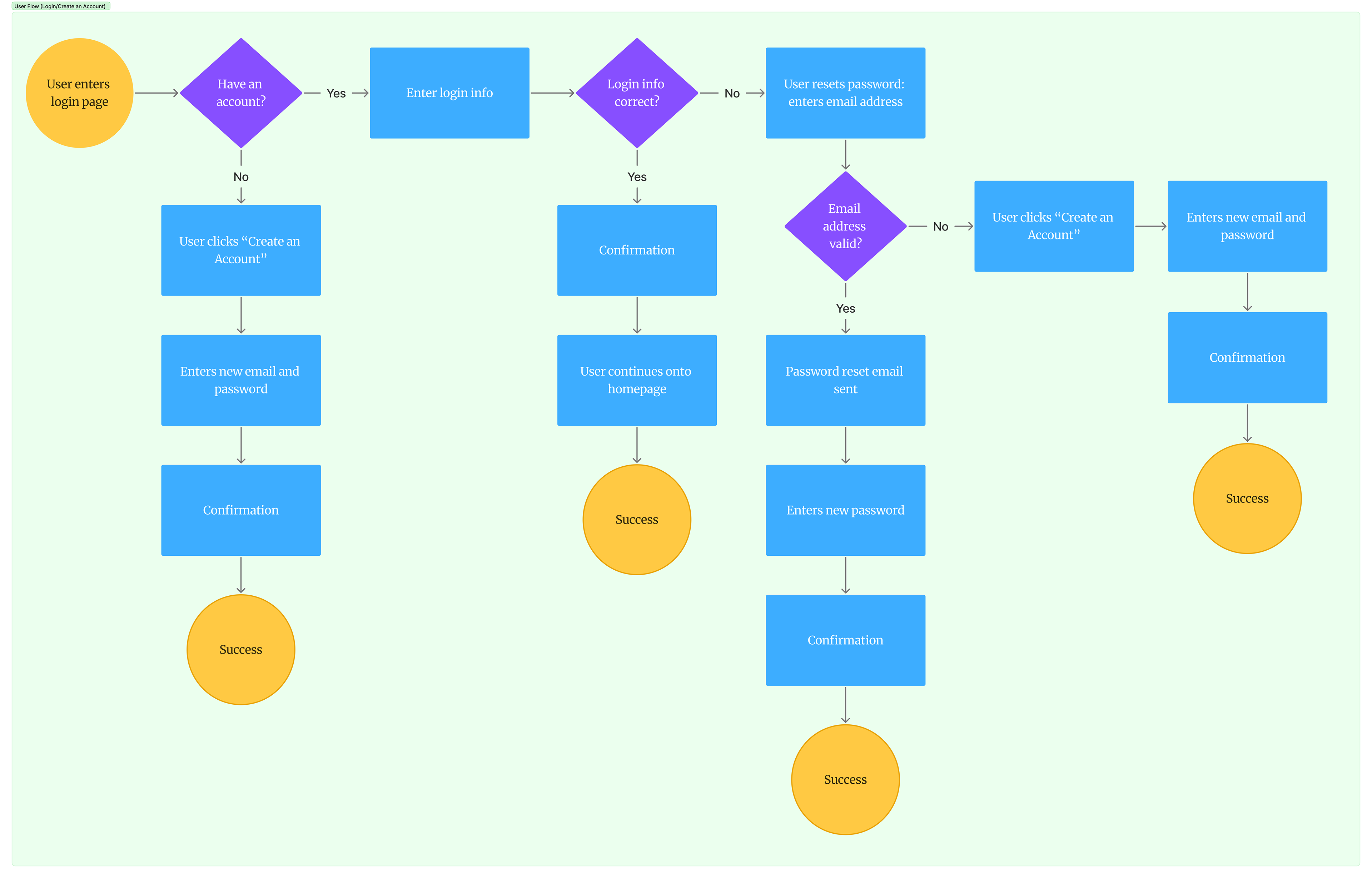
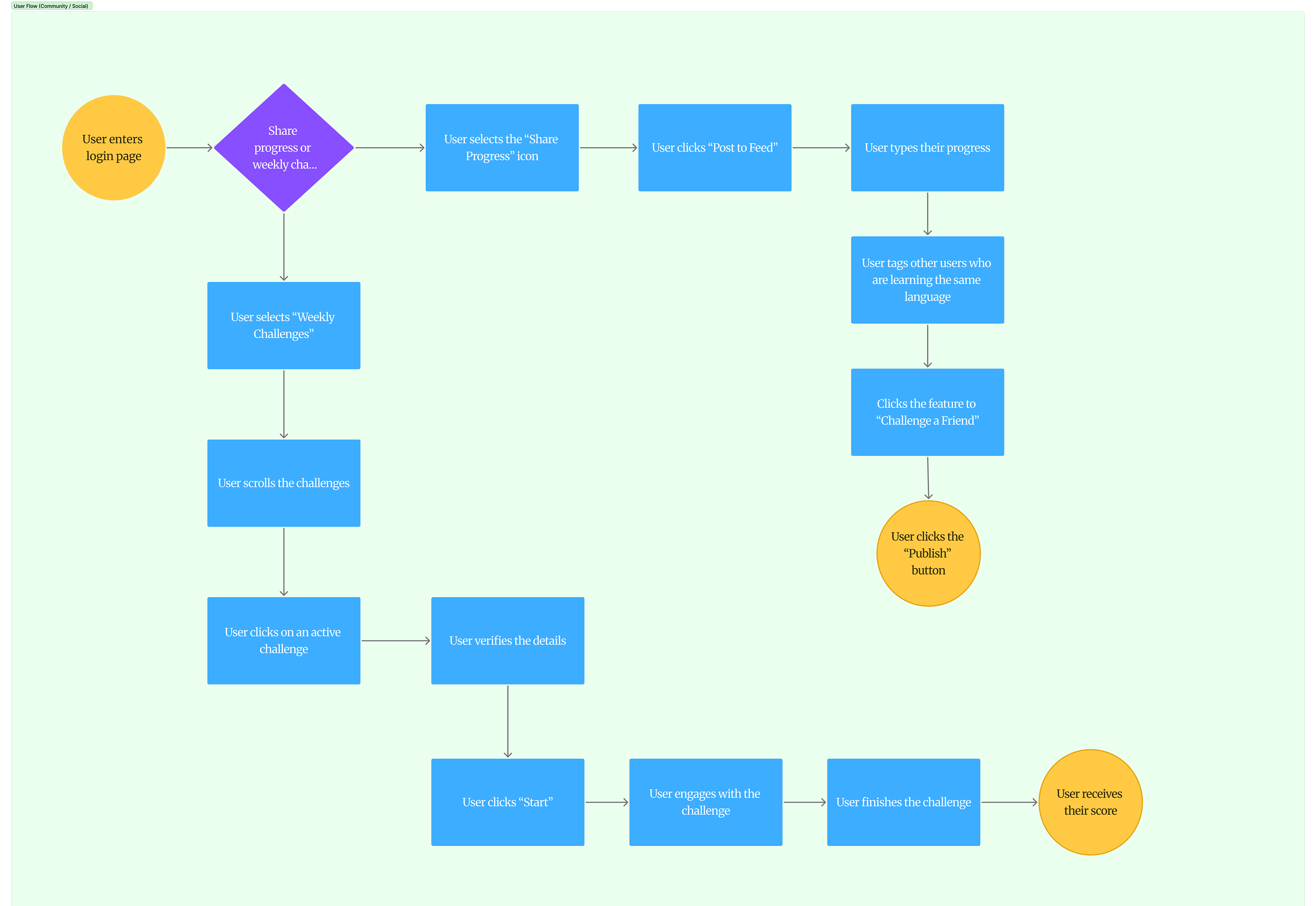
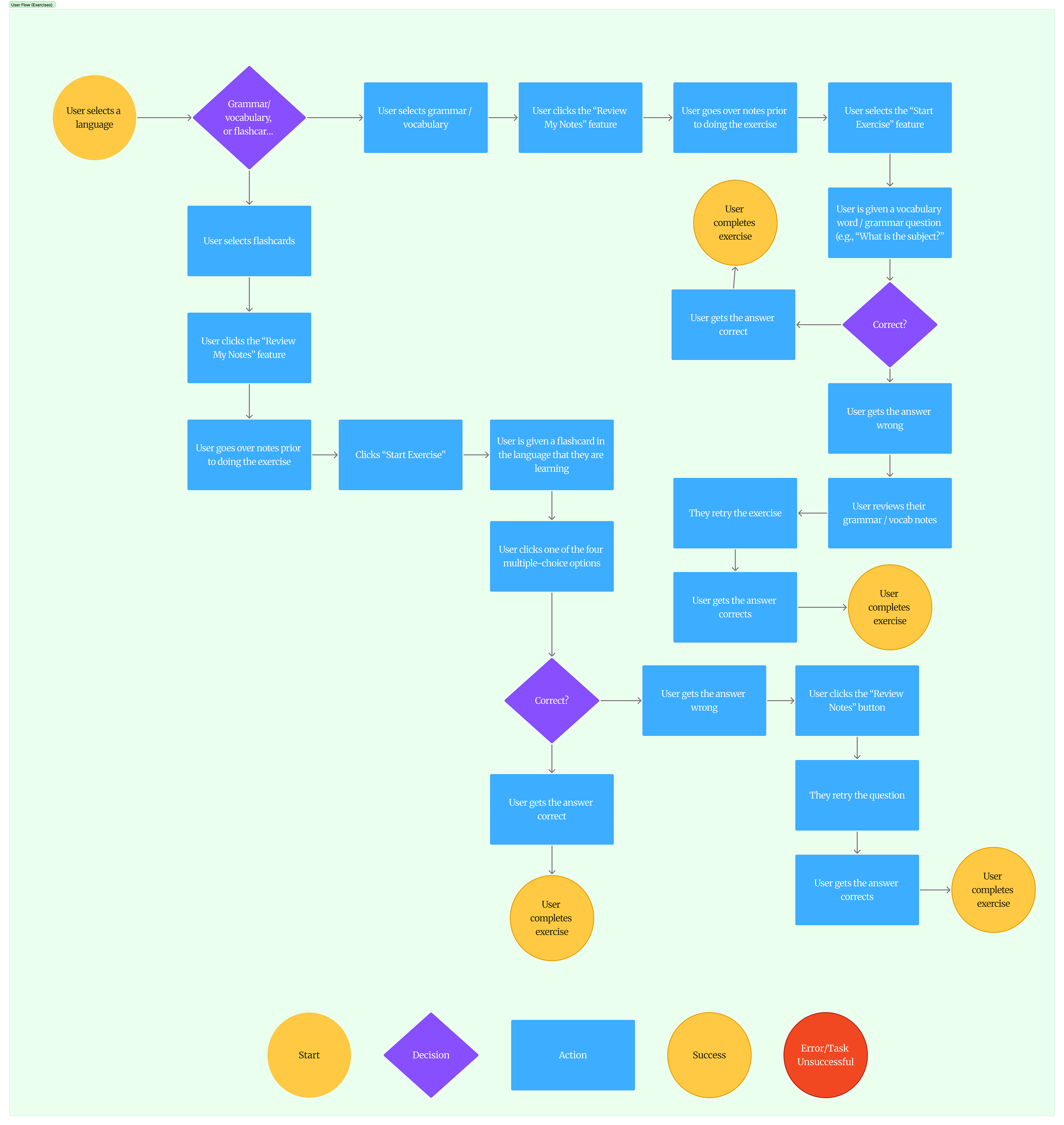
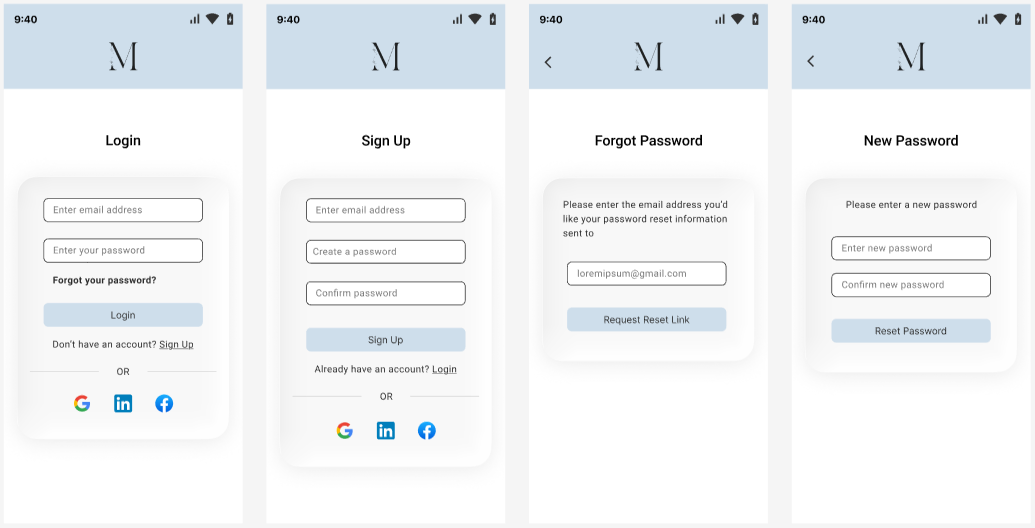
• The user flow that I created focused on pinpointing how the user would go about creating a Mot à Mot account or logging into an existing one, as well as go about performing an exercise or posting on the community channel.
• The goal was to streamline the process and focus on minimizing steps on the user's end while reducing cognitive load.
• Along with the IA, the user flow that I generated served as the foundational step in creating prototypes that were functional and responsive.
HIGH-FIDELITY PROTOTYPES
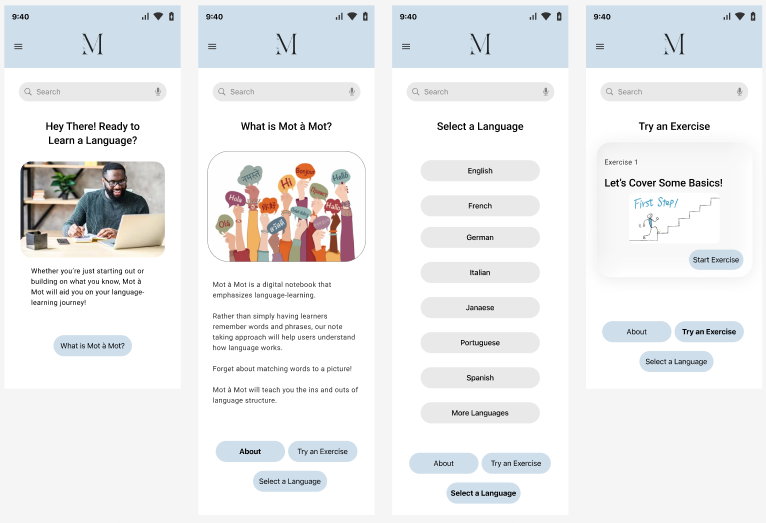
• In order to make sure the layout was intuitive, I developed prototypes that were consistent, navigable, and provided clear visual cues.
• This includes features such as clear typography, distinctive hierarchy of headings and content, consistent spacing, and intuitive iconography to guide users through each interaction.
• Similar to that, the prototypes were designed with responsive layouts so that users could navigate seamlessly across different devices and screen sizes.
ACCESSIBILITY STANDARDS
• For keyboard navigation, I ensured that users would be able to interact with the features with only the keyboard if necessary.
• This meant every feature was accessible using only the "Tab" and "Esc" buttons, for those who don't have mouse controls.
• Another accessibility standard was readability, as I made sure to develop the prototypes using a simplistic and consistent font throughout the design.
• In addition, I designed the prototypes with visual accessibility and clarity in mind, making sure that that color contrast, spacing, and layout supported users with visual impairments or cognitive difficulties.
USABILITY TESTING
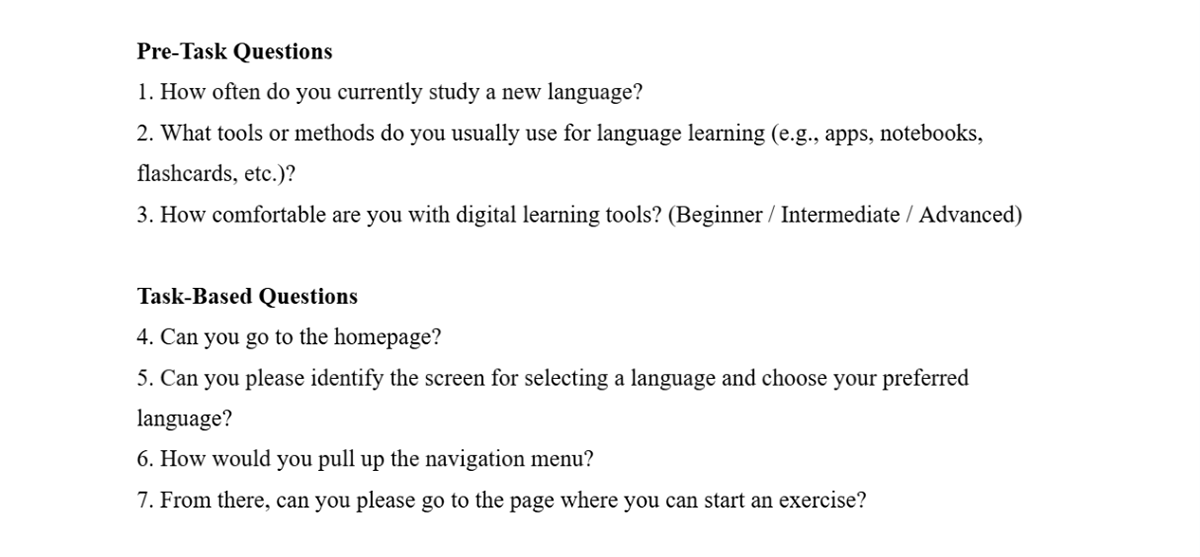
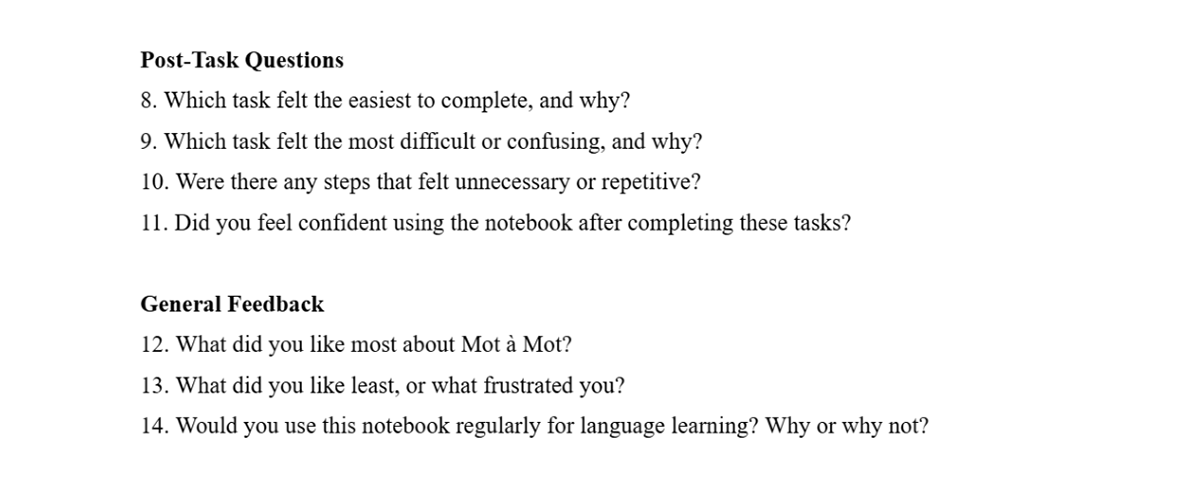
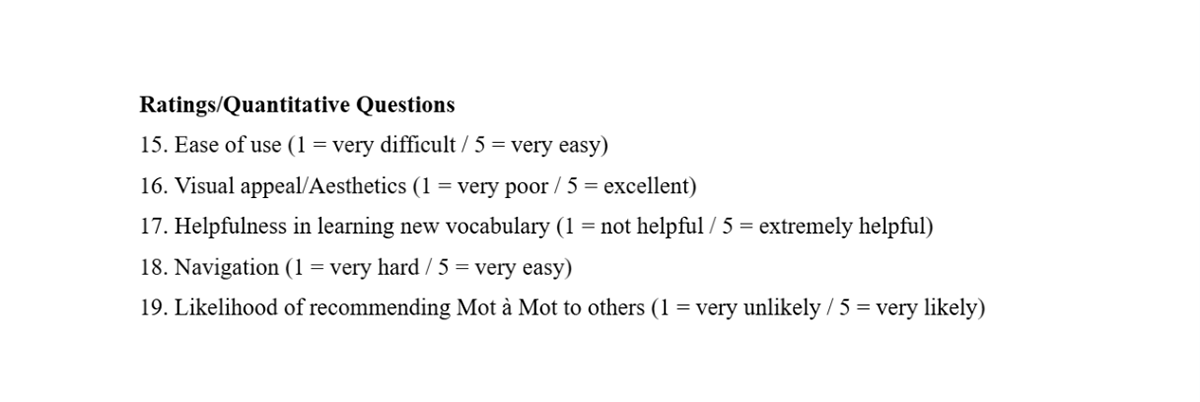
• I conducted three usability tests in total with potential users.
• During my analysis, I wanted to assess how easily users could perform certain tasks, such as finding the homepage, selecting a language, and starting an exercise.
• Through this, I was able to shed light on the common user pain points, as well as insights can that improve the overall usability.
AFFINITY DIAGRAM
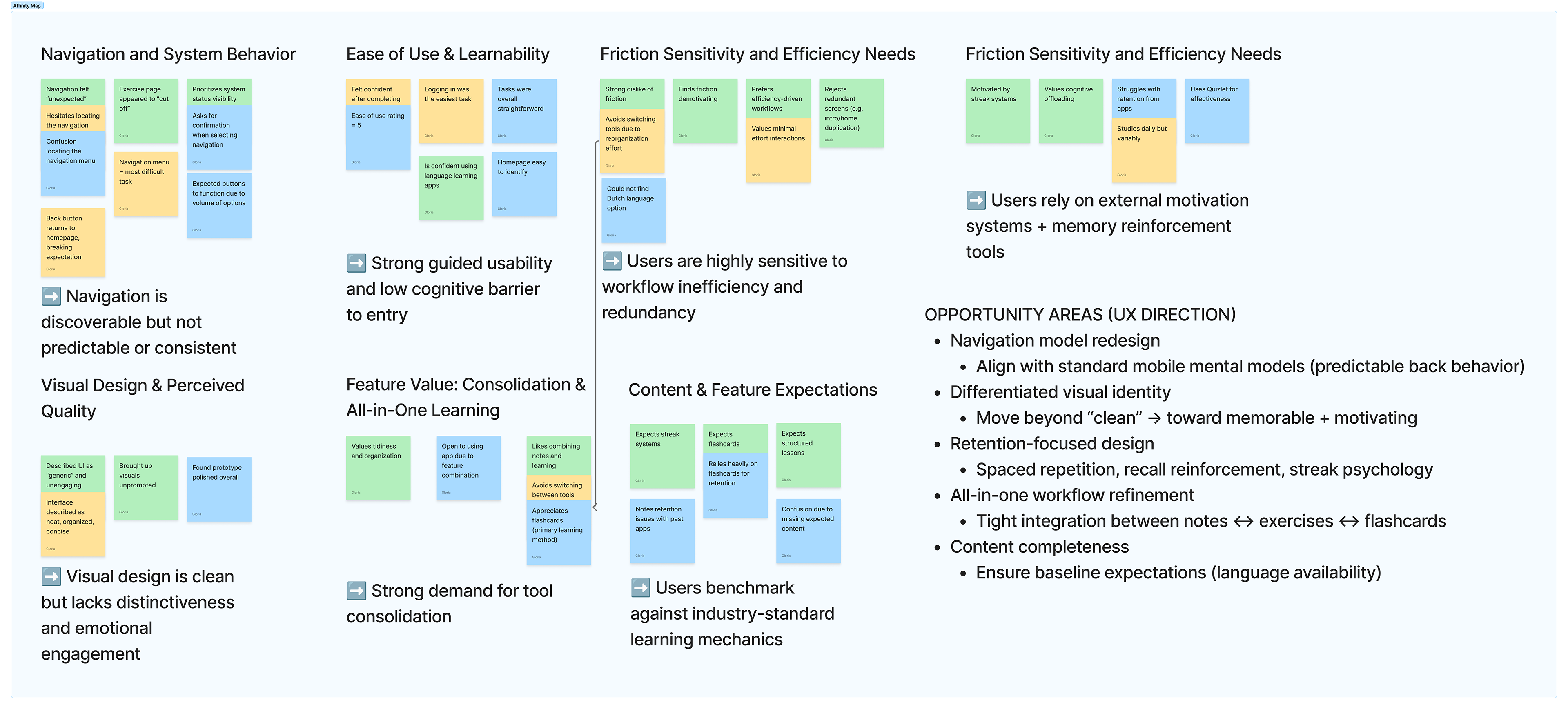
• During the synthesis phase of our research, our interview process revealed how participants valued the polished and organized layout of the system and felt that it was intuitive and had a low cognitive barrier.
• However, our users also stated how there was some confusion when it came to the navigation menu, as well as some screens that had not been developed yet that they had hoped would be part of the test.
• Moving forward, we plan to prioritize predictability, repetition to enhance their learning process, and including a broad list of language options.
USER PERSONAS
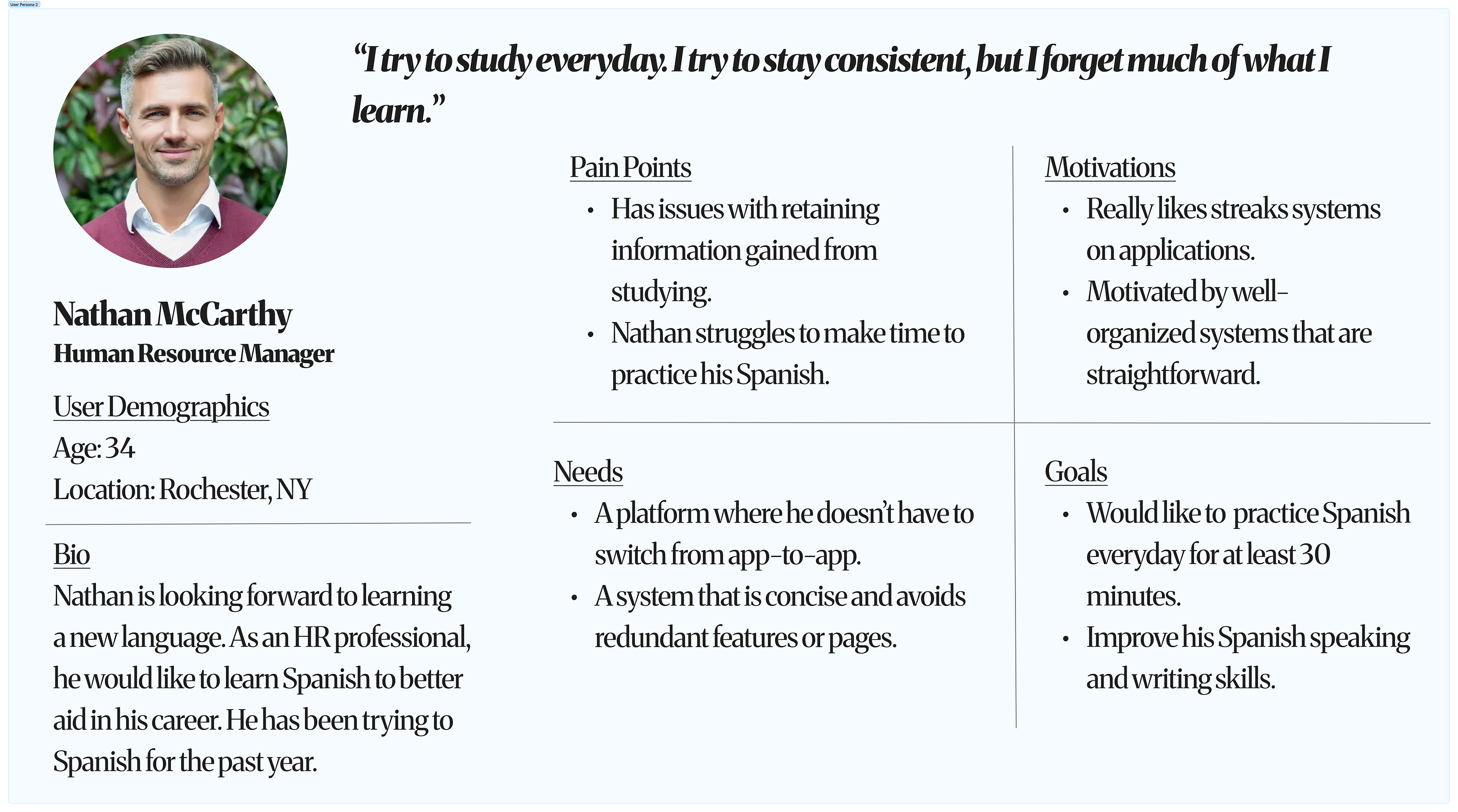
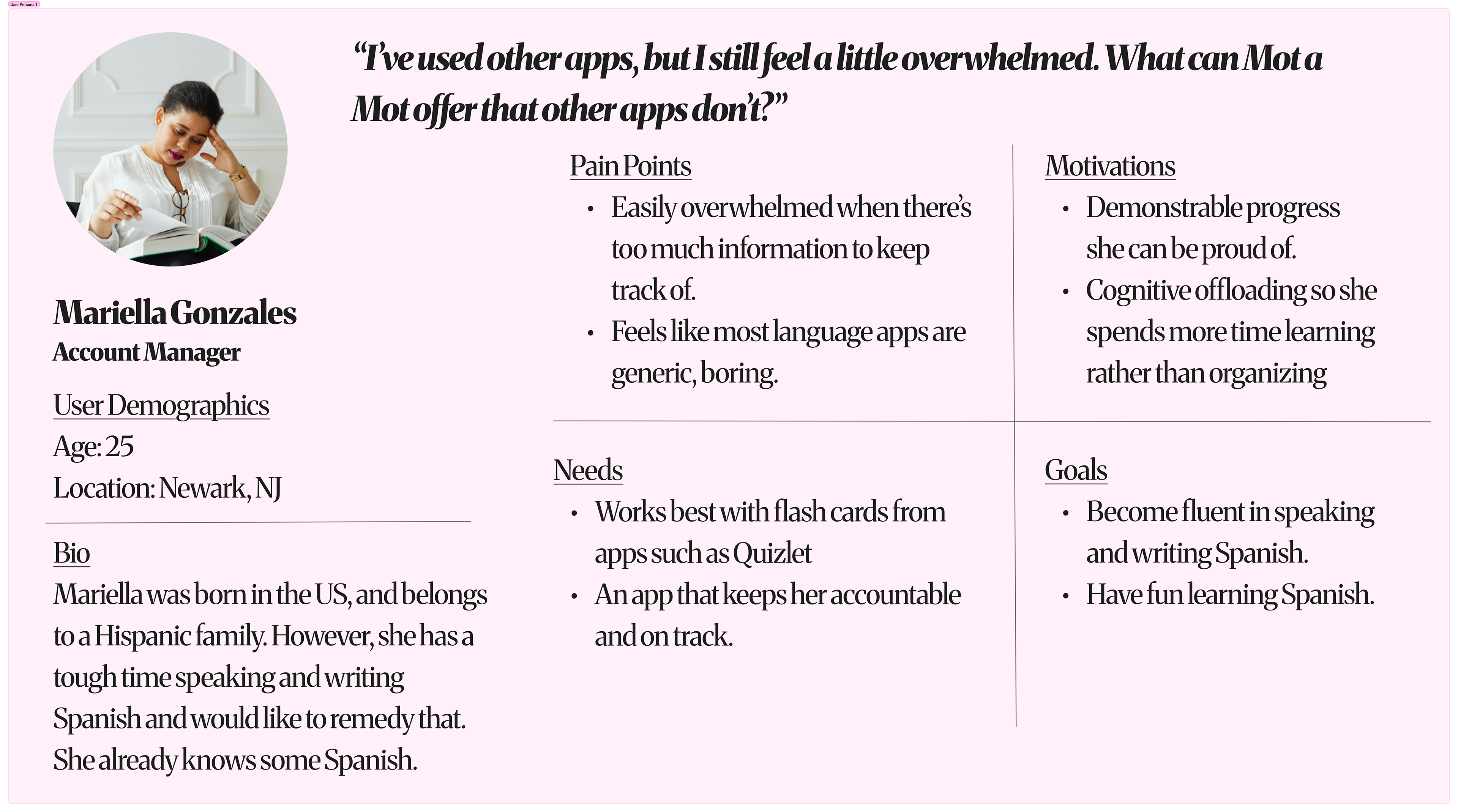
• In addition to our affinity diagrams, we wanted to transform the findings from scattered data to a true humanization.
• Doing this, we learned that the average user that we worked with felt that going back and forth between applications was tedious and that having a singular platform that integrates various language-learning features was ideal.
• Moreover, users also greatly appreciated a system that implements streaks and keeps track of their progress, given that it provides them a sense of motivation to continue using the application.
• Since our participants have very busy lives, they also supported having a system that is well-organized and allows them to focus more on learning rather than spending the bulk of their time organizing.
USER INSIGHTS
• The users whom I interviewed stated how the homepage was easy to identify and how it was great that there were links to the other screens at the bottom of the page.
• Common pain points were that some users had trouble differentiating between the homepage and the about page and felt that they should have been collapsed into one screen in a concise fashion.
• Several participants suggested adding brief contextual cues or tooltips to help distinguish content sections, especially for first-time visitors.
• Based on this feedback, I recommended consolidating redundant pages, improving menu labeling, and adding subtle design cues (e.g., highlighted tabs) to enhance orientation and reduce confusion.
STAKEHOLDER REVIEWS
• I consulted with two stakeholders, including a product owner/designer, as well as a marketing specialist.
• The positive facets that they noted were that Mot à Mot had a clean and intuitive layout, clear navigation, and consistent visual design, which made it easy to understand and interact with.
• They also appreciated that key features like language selection and exercises were easy to locate, and that the prototypes reflected a thoughtful approach to accessibility and user experience.
• Moreover, some stakeholders felt that it could've been improved by refining the menu labels and including more context for the exercise page.
KEY TAKEAWAYS
• Through early usability testing, I discovered that users sometimes struggled to differentiate between pages, which guided me to rethink navigation and simplify the layout.
• Mapping out clear information architecture and user flows allowed me to design an experience that felt intuitive, helping users focus on their language-learning goals without friction.
• By creating high-fidelity prototypes with attention to accessibility, visual hierarchy, and responsive design, I ensured that every interaction was clear, engaging, and inclusive.
• Collaborating with stakeholders confirmed that the design choices resonated with users, which validated Mot à Mot's core features and highlighting opportunities for refinement.